
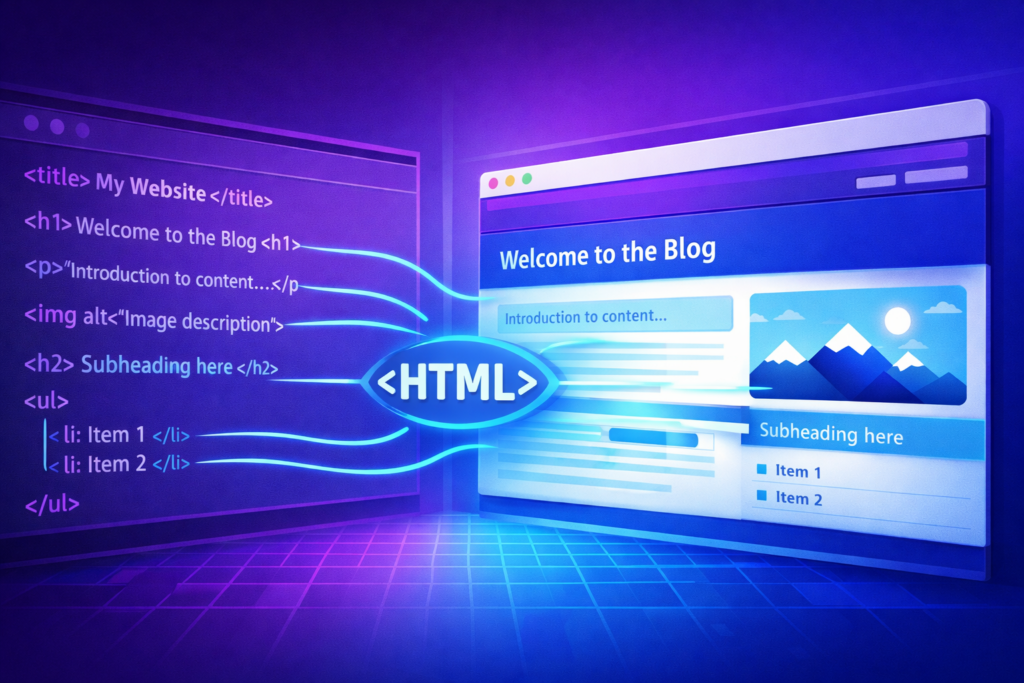
HTML tags are at the core of how a website works. They help structure content, improve page readability, and make it easier for search engines to understand.
For SEO specialists, developers, and web writers, mastering HTML tags is essential to optimize a website’s visibility on Google.
A well-structured page using the right tags makes it possible to:
- improve indexing by search engines
- enhance Google’s understanding of the content
- provide a better user experience
- optimize content readability
In this complete guide, we will explore the most important HTML tags for SEO, how to use them effectively, and the best practices to optimize your content.
What is an HTML tag?
HTML (HyperText Markup Language) is the language used to structure web pages. An HTML tag is a piece of code that defines the role of content within a page: title, paragraph, image, link, or section.
For example:
<h1>HTML tags guide for SEO</h1>
<p>HTML tags help structure the content of a web page.</p>
In this example:
<h1>defines the main title<p>represents a paragraph
HTML tags are generally composed of two elements:
- an opening tag
- a closing tag
Example:
<p>Paragraph text</p>However, some tags are self-closing, such as the image tag:
<img src="image.jpg" alt="image description">These elements allow browsers and search engines to understand the structure and hierarchy of information.
For SEO, some tags are particularly important because they help Google determine the main topic of a page and how the content is organized.
Why are HTML tags important for SEO?
Search engines analyze the HTML structure of a page to understand its content. Proper use of HTML tags allows:
- Better content understanding: heading tags help search engines identify the main topics of a page.
- Better indexing: tags such as title, meta description, or alt provide important information.
- Better user experience: a well-structured page is easier to read and navigate.
User experience has become a key ranking factor.
The most important HTML tags for SEO
Some tags have a direct or indirect impact on SEO. Here are the main ones to know.
The Title tag: a key ranking factor
The title tag is one of the most important SEO elements. It corresponds to the title displayed in search results.
<title>HTML SEO tags: complete guide to optimize your website</title>It is visible in 3 places:
- in Google and other search engine results
- in the browser tab
- in some social media shares
Best practices to optimize the Title tag
- ideal length: 50 to 60 characters
- include the main keyword
- be clear and compelling
- create a unique tag for each page
A well-optimized title tag improves both SEO and click-through rate (CTR).
Meta description: optimize CTR
The meta description is an HTML tag that summarizes a page’s content.
<meta name="description" content="Discover essential HTML tags to improve your SEO and structure your web content effectively.">Although it is not a direct ranking factor, it strongly influences the click-through rate.
Best practices
- ideal length: 140 to 160 characters
- naturally include a keyword
- encourage clicks
- clearly summarize the page
Heading tags (H1, H2, H3…)
Heading tags, also called Hn tags, are used to structure content.
<h1>Essential HTML tags for SEO</h1>
<h2>What is an HTML tag</h2>
<h3>Example of a tag</h3>
Title hierarchy
The tags follow a hierarchical logic:
- H1: main title
- H2: main sections
- H3: subsections
- H4 to H6: additional levels
SEO best practices
- use only one H1 per page
- structure content logically
- naturally include keywords
- avoid skipping hierarchy levels (e.g., H2 → H4)
A good heading structure improves:
- readability
- SEO
- user experience
Image Alt tag
The alt tag (alternative text) describes the content of an image.
Example:
<img src="html-seo-tags.jpg" alt="example of HTML tag structure for SEO">Why the Alt tag matters
- improves accessibility
- helps Google understand images
- enables appearance in Google Images
Best practices for the Alt tag
- Describe the image precisely
- Keep it concise
- Include a keyword if relevant
- Avoid over-optimization
Link tags
Links are created using the a tag.
<a href="https://stiv.media/link-building-guide">Complete link building guide</a>In this example:
- Complete link building guide represents the link anchor, that is, the phrase on which the redirect link is “placed”.
- https://stiv.media/link-building-guide represents the destination URL, that is, the page to which the user will be redirected when they click on the link.
Links play a central role in SEO. They help:
- improve navigation
- transfer authority between pages
- help search engines crawl the site
Best practices
- use descriptive anchor text
- avoid generic anchors like “click here”
- create a logical internal linking structure
Strong and Em tags to highlight information
The strong (bold) and em (italic) tags are used to highlight certain words.
Example:
<strong>SEO</strong>
<em>search engine optimization</em>
These tags help identify the most important elements in a text.
Difference between the two
- strong indicates strong importance
- em indicates emphasis (it is sometimes incorrectly used for quotes, for which it is better to use the <cite> tag)
These tags can help search engines identify important parts of a text. However, they should be used in moderation.
Semantic HTML tags
HTML5 introduced several tags that improve page structure.
For example:
<header>
<nav>
<main>
<article>
<section>
<footer>
Semantic tags make it possible to:
- better organize content
- improve accessibility
- help search engines understand site structure
Useful tags for structuring content
Some tags improve content readability. Among them:
Bullet lists using <ul>, <ol> and <li> tags
Lists make information easier to read and organize.
Example:
<ul>
<li>Information #1</li>
<li>Information #2</li>
<li>Information #3</li>
</ul>
Here, the <ul> tag opens the list and the <li> tags introduce each item.
What is the difference between <ul> and <ol> tags?
The <ul> tag represents a bullet list with dots, while the <ol> tag creates a numbered list.
Lists are particularly useful for:
- guides
- tutorials
- comparisons
Paragraphs
The p tag is used to structure text.
<p>HTML tags play an essential role in SEO.</p>It is recommended to:
- favor short paragraphs
- space out the text
- make reading easier on mobile devices
SEO mistakes to avoid
Some bad practices can harm SEO.
Using multiple H1 tags
Having multiple H1 tags can confuse the main topic of a page. Even if Google can understand them, it is better to keep only one H1.
Keyword over-optimization
Avoid over-optimizing your titles and subtitles. This is known as keyword stuffing.
<h2>SEO SEO optimization SEO</h2>This practice may be considered spam by search engines.
Using tags only for styling
HTML tags should be used to structure content, not just to change appearance. Styling should be handled with CSS, which improves the visual readability of the page.
Tips for web writers
To fully leverage HTML tags in your SEO content, follow these best practices:
- Structure your article before writing: creating an outline with Hn tags helps organize ideas.
- Use headings to guide reading: users scan pages rather than read them fully, so headings must be clear and informative.
- Optimize images: adding relevant alt tags improves image SEO.
- Work on internal linking: add links to relevant content to improve navigation, indexing, and time spent on the site.
SEO FAQ about HTML tags
Here are some of the most frequently asked questions about HTML tags.
What is the most important HTML tag for SEO?
The title tag is generally considered the most important for SEO. It indicates the main topic of a page and appears in search results.
How many H1 tags should be used on a page?
It is recommended to use only one H1 tag per page to clearly define the main topic.
Does the meta description impact SEO?
The meta description is not a direct ranking factor, but it influences the click-through rate in search results.
Are HTML tags still important for SEO?
Yes. Even though search engine algorithms have become more sophisticated, HTML tags remain essential for structuring content and making it easier to understand.
Conclusion
HTML tags are a fundamental part of technical SEO and web writing.
When used properly, they help to:
- structure content
- improve readability
- facilitate indexing by search engines
- enhance user experience
Whether you are a web writer, SEO specialist, or website creator, mastering HTML tags is essential to build high-performing and well-ranked pages.
Do you want support in your content production for link building? We help you design your campaigns to develop your authority without leaving a footprint.
